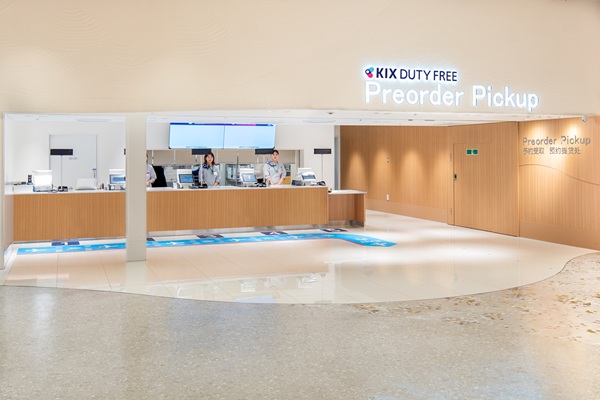
Customers who make preorders are kindly requested to review the following instructions regarding the pick up process.
1.Pick Up Process and Counter location
①From order to arrival at the preorder pickup counter

②Pickup after arrival at the preordre pickup counter

*If your pickup number is displayed under "Ask our staff for assistance" , please speak to a nearby staff member instead of heading to the checkout counter.
2.FAQ
①Where can I pick up my orders?
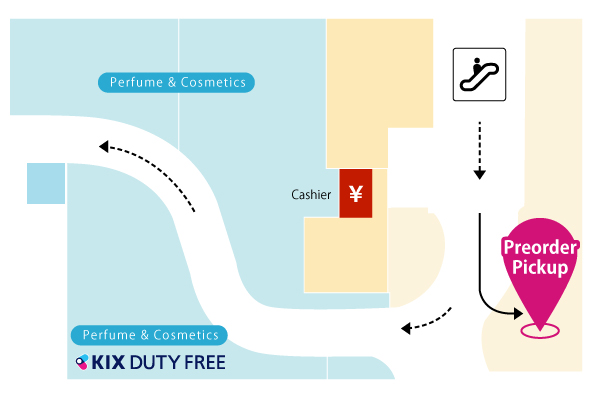
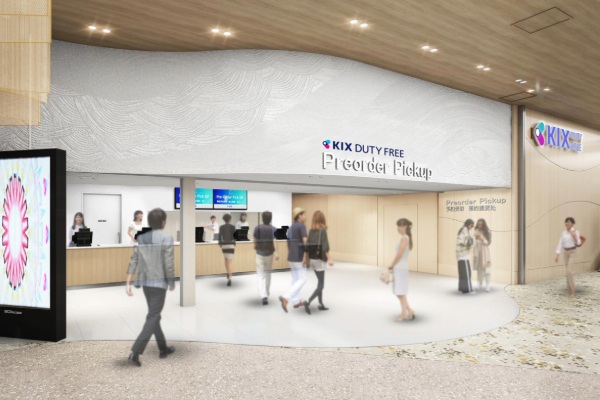
It is located in front of the entrance of KIX DUTY FREE, where you exit the immigration and go down the escalator.
②Where can I check the 2D barcode?
You can check your "Order history" in the "My Account" section of the preorder website.
3.If You Have Multiple Preorders
①Order types
Preorders are divided into two types, "Online Preorder" and "Same Day Pickup", depending on when they are placed.
| Online Preorder | Orders placed by 17:00 the day before departure |
|---|---|
| Same Day Pickup | Orders placed after 17:00 the day before departure and up to 3 hours before departureOnly items eligible for Same Day Pickup can be ordered. |
When picking up your preorders, please present the latest 2D barcode shown in "Order history" in "My Account".
2D barcodes sent by email or saved as screenshots may not reflect preorders added or canceled afterward.
Check "Order history"②How to display your 2D barcode
- 1
Before coming to the preorder pickup counter, open "Order history" in "My Account".
- 2
Tap "VIEW QR CODE" on a preorder for this departure day.
- 3
Present the displayed 2D barcode to our staff.
*Online Preorder: For online preorders on the same departure day (up to 30 orders), the same 2D barcode is used.
*Same Day Pickup: A different 2D barcode will be issued for each Same Day Pickup.
③Number of 2D barcodes to present
・Online preorders and Same Day Pickups use separate 2D barcodes. Please present them separately.
・Online Preorder: For online preorders on the same departure day (up to 30 orders), the same 2D barcode is used. If you present any one of these 2D barcodes, we will process them all at once.
・Same Day Pickup: A different 2D barcode will be issued for each Same Day Pickup. To pick up all of your preorders, please present the 2D barcode for each Same Day Pickup.
・The number of 2D barcodes you need to present is unrelated to the number of items.
| Your preorders | 2D barcodes to present |
|---|---|
| Online Preorders only | Only 1 (up to 30 orders) |
| Same Day Pickups only | Number of 2D barcodes presented = Number of ordersPlease present the 2D barcode for each Same Day Pickup. |
| Online Preorders + Same Day Pickups | Any one 2D barcode for your online preorders + the 2D barcode for each Same Day PickupExample: 10 online preorders + 2 Same Day Pickups → a total of three 2D barcodes |
*The maximum number of orders that can be processed with a single 2D barcode is 30 orders. For 1 to 30 orders, the same 2D barcode will be used; for 31 to 60 orders, 61 to 90 orders, and 91 to 120 orders, different 2D barcodes will be provided for each group. To display the 2D barcode for your 31st and subsequent orders, tap "VIEW QR CODE" on one of your more recent preorders.
*Online Preorder: Orders placed by 17:00 the day before departure.
*Same Day Pickup: Orders placed after 17:00 the day before departure and up to 3 hours before departure.
④Frequently asked questions
- Can I use the 2D barcode sent to me by email?
- The 2D barcode in the email only includes the preorders placed at the time the email was sent. Preorders added or canceled afterward are not reflected, so please present the latest 2D barcode from "Order history" in "My Account" when picking up your preorders.
- I received an email for each Same Day Pickup and now have multiple 2D barcodes.
- A different 2D barcode will be issued for each Same Day Pickup. When picking up, please present the 2D barcode for each Same Day Pickup.
- What happens if I add a preorder?
- The 2D barcode in "Order history" shows the latest information, including the added preorder. After adding a preorder, please display the 2D barcode again from "Order history".
- What happens if I cancel part of my reservation?
- Canceled preorders will be automatically removed, so only the final number of confirmed preorders will be processed. After canceling, please display the 2D barcode again from "Order history".